Flow Analyzer
The Flow Analyzer gadget provides a point to point analysis of paths between designated points of interest within journeys. It identifies patterns of user behavior, and how intermediate points have an effect on the overall journey. It enables businesses to measure the effectiveness of interventions, such as agent assistance, or offers.
The gadget presents where in the journey it would be most effective to intervene, which existing interventions are the most engaging to visitors, the common paths that lead to a particular end point, and the paths and events which result in abandonment.
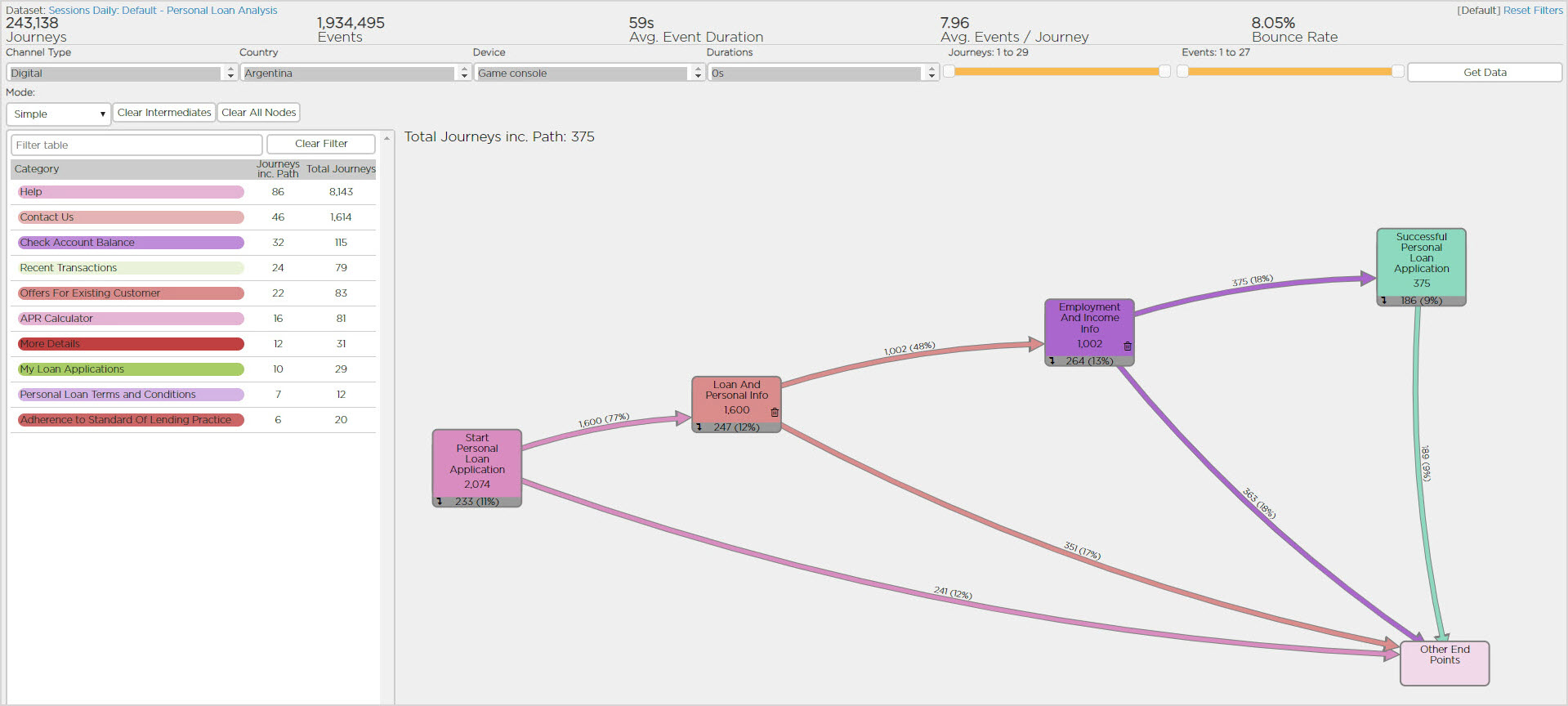
The Flow Analyzer gadget presents the following information:
- Journeys: The number of visits to the website (in the case of web journeys) and calls within the IVR (in the case of IVR journeys).
- Events: Events are the individual steps which a journey consists of. For a web-based journey, these are page views or form submissions. For IVR-based journeys, these are the discrete steps or decision points within the IVR flow.
- Average Event Duration: The average time that elapsed from one event to the next. Expressed in minutes and seconds (mm'ss"). Bounces are excluded since they only consist of one event.
- Average Events / Journey: The average number of events (for example, page views or IVR steps) which each journey consisted of. This can be an indicator of customer effort.
- Bounce Rate: The number of journeys where the customer did not proceed beyond the first event (for example, the landing page of the site or the 1st set of IVR options). This is expressed as a percentage of the total number of journeys.
Paths for Flow Analysis:
Paths for flow analysis have the following format.
- Source: The selected starting node.
- Target: The selected end point.
- Intermediates: Optional nodes that occur between the Source and the Target.
- Other End Points: A node to highlight journeys that passed through the Source and Intermediate nodes, but not the Target.
Building a Path for Flow Analysis
By selectively adding intermediate nodes from the Category table, you can see what has lead the user to a certain end point, and identify patterns of behavior. You can view the abandonment rate at each selected node in the journey path, and therefore identify opportunities for intervention and improvement. The effectiveness of these interventions at key points in the journey can be measured for effectiveness.
For example, giving the following flow analysis, you can examine whether the use of agent assistance during the checkout process helps conversion:
- Source: Shopping Cart
- Target: CheckoutSuccess
- Intermediates: ChatEngaged
- Other End Points
Flow Analyzer enables you to analyze the impact of the chat - if a large number of people journey from ChatEngaged to CheckoutSuccess, then this shows that the chat has been effective in helping the customer towards their goal.
To build a path for flow analysis:
- Drag the desired Source node from the Category table into the left hand column of the canvas.
- Drag the desired Target node from the Category table into the right hand column of the canvas.
- Once both nodes have been dropped, the path for flow analysis builds, automatically adding the Other End Points node.
- Selectively drag intermediate notes from the Category table into the canvas.
- Click Get Data to refresh the data for each intermediate node or nodes added.
- Select Clear Intermediates to remove all intermediate nodes, or Clear All Nodes to remove all nodes.